


Alphabet Scape: search words
4.4180.00 Reviews
App Specs
- Version
- 12.505
- Updated On
- License
- Free
- Downloads
- 10,000+
- Developer
- Salomo Interiors SL
- Categories
- Word
- Platform
- Android
Screenshots
 Analysis by AppCompare
I spent time with Alphabet Scape as a quiet word game rather than treating it like a race or a test of speed. That distinction matters. Its main appeal is the simple act of searching for words, so the experience feels closer to a short mental break than to a demanding competitive game. I can imagine opening it while waiting for an appointment, settling down after work, or looking for something gentle to do without committing to a long session.
Developed by Salomo Interiors SL, this free word game is aimed at a broad audience and carries an Everyone content rating. It has reached over ten thousand installs and holds a 4.4 average from more than eight hundred ratings, which suggests that its straightforward idea has found a modest but positive audience. I would describe it as an easy game to understand, though not necessarily an ideal fit for every player or every situation.
The important question for me was not simply whether I could find words. It was whether the game stayed comfortable to read, control, and follow when my attention was divided or my hands were tired. That is where Alphabet Scape becomes more interesting. Its uncomplicated format removes some barriers found in busier games, but a word-search design still depends heavily on visual detail and precise interaction.
How the word-search layout feels in everyday use
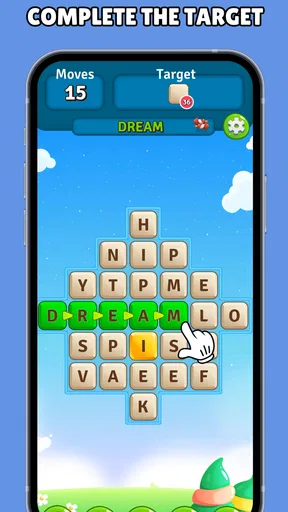
The first strength is the low learning curve. I did not need a tutorial-heavy introduction or knowledge of a complicated ruleset to begin. The purpose is immediately understandable: examine the letters, identify words, and interact with the puzzle. For someone who wants a game that explains itself through use, that is a real advantage.
That clarity also makes it suitable for occasional players. I could leave it for a while and return without having to remember a story, a character build, or a chain of special moves. This is useful for people who prefer predictable routines, including players who find rapidly changing interfaces tiring. The game’s word-focused structure gives each session a clear mental task without surrounding it with unnecessary systems.
Readability is more complicated than simple recognition. Word puzzles ask me to compare letters across a busy field, and that can become demanding when several possible words overlap or when I am scanning quickly. I found that the best approach was to slow down deliberately, inspect one area at a time, and avoid trying to solve the entire board in a single glance. That is not a flaw unique to this title, but it is an important part of deciding whether this kind of game suits you.
I also appreciated that the game can be approached without a need for spoken instructions or constant audio attention. A player who prefers to keep sound low, or who is using the game in a shared room, can still understand the central activity through the puzzle itself. That makes it more practical than games whose feedback depends on sound effects, dialogue, or timing cues.
Worth Reading Before You Choose

Flipboard Shows What News Apps Must Do Beyond the Feed

Switching to Android Auto Means Rethinking Your Driving Routine

Google Calendar Makes a Crowded Week Easier to Manage

Ludo King Makes the Most of the Minutes Between Plans

Baby Panda World Brings Quick Play to Modern Phones, but Its Game Library Feels Busy

ESPN’s Live Game View Makes Following Close Games Easier
Navigation benefits from the same simplicity. There are fewer layers to remember than in a typical word game that combines puzzles with daily challenges, social rankings, collectible items, and multiple currencies. Alphabet Scape feels more focused. I can open it with a specific intention—find words for a few minutes—and avoid the feeling that I must manage a second task before the actual puzzle begins.
Still, simple does not automatically mean effortless. Anyone with reduced contrast sensitivity, difficulty distinguishing letter shapes, or visual fatigue may find a dense letter arrangement harder than the calm presentation suggests. I would recommend testing a short session rather than assuming that a minimal concept guarantees comfortable access. The central challenge remains visual scanning, and that is the part most likely to decide whether the game works for you.
Why the calm format helps some players
For me, the absence of pressure is one of the most useful qualities. I can treat a puzzle as a concentration exercise instead of a performance. That makes it a reasonable choice for a short break when I want to switch my attention away from messages or work. It also gives the game a gentler personality than timed word titles, where the clock can become more important than the words themselves.
This calm approach may suit older players, beginners, and people who are returning to mobile games after a long break. The game does not require me to learn a large set of gestures or coordinate several controls at once. A person who already enjoys crosswords or traditional word searches will understand the basic appeal quickly, although the phone format may feel less spacious than paper.
There is a useful trade-off here. The focused design makes the game approachable, but it may feel limited to players who want constant novelty, a strong narrative, or a sense of progression beyond solving the current puzzle. I would not choose it as a replacement for a large, feature-rich puzzle collection. I would choose it when I want the word-search activity itself to remain the main event.
Reading strategy matters more than speed
One practical tip improved my sessions: I stopped searching randomly and divided the board into small visual zones. I scanned horizontally, then vertically, and finally checked diagonals or less obvious directions. This method reduced the strain of repeatedly moving my eyes across the whole screen. It is especially helpful when concentration is low, because it turns a vague search into a repeatable routine.
Another useful habit is to adjust the distance between the phone and my face rather than forcing myself to read from one fixed position. A slightly different viewing angle can make letter shapes easier to separate, particularly in bright surroundings. That is a personal workaround rather than a dedicated setting, but it shows how much the experience depends on the player’s visual comfort and environment.
Controls, sensory load, and different abilities
Alphabet Scape is less demanding on motor skills than action games because it does not ask me to steer, jump, aim, or react in a split second. That lowers the pressure for players who find fast gestures difficult or who prefer to use one hand. The interaction is tied directly to selecting words, so I can concentrate on a single task instead of coordinating several controls.
Even so, word selection can require deliberate finger movement. If a player has tremors, limited reach, joint pain, or difficulty maintaining a steady drag, tracing a word may be uncomfortable. A small slip can also be frustrating because the intended letters may not register as expected. I would be cautious about recommending it to someone who specifically needs large, forgiving touch targets unless they have tried the game on their own device.
One of the less obvious trade-offs is the difference between cognitive simplicity and physical precision. The rules are easy to understand, but the board can still demand careful visual-motor coordination. A player may know exactly which word to select and still struggle to complete the gesture comfortably. That is why I see the game as accessible in concept rather than universally accessible in execution.
Players with limited color perception should also pay attention to how clearly selected letters stand apart from unselected ones. Word puzzles often rely on visual state changes to show progress, and those changes need to be easy to notice. I would not make assumptions based only on the calm presentation. If distinguishing highlights is difficult, the game may become slower or more tiring even when the text itself is readable.
On the sensory side, the restrained word-game format is likely to be easier for people who avoid loud, visually crowded entertainment. It does not ask for the constant monitoring associated with action gameplay. That can make it a better choice in a quiet routine, during a wind-down period, or for someone who becomes overwhelmed by too many simultaneous effects.
However, calm does not mean ideal for every sensory preference. A player who needs strong audio feedback may find a primarily visual puzzle less reassuring, particularly if they are trying to reduce screen viewing. Likewise, someone who enjoys rich animation and immediate rewards may experience the presentation as too subdued. The game’s accessibility advantage comes from reducing complexity, not from offering a solution for every sensory need.
Who can benefit from the slower pace
I think the game is at its best for people who want a repeatable mental routine. A commuter could play a small amount while seated and waiting, provided the surroundings are stable enough to read the screen. A parent could use it during a short quiet interval without worrying about remembering a complicated story. Someone who enjoys language practice may also use the search activity to focus attention on spelling and word patterns, though I would treat that as a personal benefit rather than a formal learning feature.
It may also work for players who dislike losing because of reaction time. The word-search format puts more emphasis on observation than reflexes, which gives a different kind of satisfaction from arcade games. I found that solving a difficult arrangement felt rewarding because I had noticed a pattern, not because I had tapped faster than a timer.
The reverse is equally important. If you need a game that can be played without looking at the screen, this is not the right choice. If hand movement is painful, if letter grids are difficult to inspect, or if you want spoken guidance, another type of word activity may serve you better. A crossword with larger text, an audio word game, or a turn-based title with more generous controls could be a better match depending on the specific need.
Using it in real situations
My most natural use case was a short evening session. After a busy day, I wanted something more engaging than passive scrolling but less intense than a competitive game. Alphabet Scape gave me a defined activity: look, search, confirm, and move on. That structure helped me stay present without making the session feel like another obligation.
It also fits moments when attention is available in small pieces. If I have only a few minutes, I do not need to prepare a long campaign or remember where I left off in a story. The word-puzzle format is easy to pick up. That makes it more practical than many alternatives that are enjoyable only when I can give them uninterrupted time.
There are environmental limits, though. On a moving vehicle, in direct sunlight, or in a dim room, reading a letter grid can become noticeably harder. A crowded space can also make it difficult to maintain the careful attention that word searching requires. I would use it in a stable, moderately lit setting rather than treating it as a game for every kind of waiting time.
The free entry price lowers the risk of trying it. I could explore the basic experience without paying upfront, while in-app purchases range from ninety-nine cents to one hundred four dollars and ninety-nine cents per item. That broad range is worth keeping in mind before making any purchase. I would approach optional spending carefully and decide in advance whether I am happy using the free experience, rather than allowing a relaxing game to turn into an unplanned expense.
The game runs on Android from version 7.1 onward, so compatibility includes older supported devices as well as newer phones. That can matter for families or individuals who do not replace hardware frequently. Still, compatibility alone does not guarantee an equally comfortable experience: screen size, brightness, touch response, and display sharpness can all affect how easy the letter board is to use.
How it compares with familiar word-game alternatives
Compared with a crossword app, Alphabet Scape asks less of me in terms of clue interpretation. I do not need to think through a definition or enter an answer letter by letter. The challenge is visual discovery, which makes it easier to start but potentially less satisfying for someone who wants deeper vocabulary questions.
Compared with a timed anagram game, it feels less frantic and less dependent on rapid typing. That is a meaningful advantage for players who dislike countdowns or who need more time to process letters. The trade-off is that it may provide less excitement for people who enjoy pressure and quick decision-making.
Compared with paper word searches, the phone version is more convenient to carry and easier to open spontaneously. A physical book can offer a larger page and a familiar pen-and-paper feel, however, which may be preferable for people who experience screen fatigue or find touch gestures imprecise. I would choose Alphabet Scape for portability and immediate access, not because it eliminates the strengths of printed puzzles.
It also differs from large puzzle platforms that combine several formats in one app. Those collections offer variety, while this game’s narrower identity can feel more peaceful. If I want sudoku, crosswords, logic grids, and word searches in one place, another option is likely better. If I specifically want a focused search-for-words activity without a lot of extra systems, Alphabet Scape makes more sense.
Where the experience still creates barriers
The main remaining barrier is the dependence on visual scanning. A player can understand the rules perfectly and still find the board tiring. This affects people with low vision, visual processing difficulties, or headaches triggered by extended screen concentration. I would recommend short sessions, a comfortable viewing distance, and stopping when the puzzle becomes effortful rather than relaxing.
Touch precision is the second concern. The interaction may feel easy for a player with steady control, but not everyone has the same dexterity. A person with limited mobility should test whether selecting words feels natural before investing time or money. The fact that a game is slow-paced does not automatically make every gesture accessible.
There is also a contextual barrier for players who need audio-first access. Because the core task is to inspect letters on screen, the game is not an obvious choice for someone who cannot rely on visual information. I would prefer a word game designed around spoken prompts or keyboard entry in that situation. Alphabet Scape’s simplicity helps many players, but it does not change the sensory requirements of its central mechanic.
In-app purchases are another point where I would ask users to be deliberate. The game is free to start, but the available purchase range is wide. Anyone sharing a device with children should pay attention to purchase controls at the device level and establish clear expectations before handing over the phone. That is sensible practice for any free game with optional spending, and it is particularly relevant when the title’s Everyone rating may attract a broad family audience.
I would also avoid presenting the game as a complete brain-training program. Finding words can be mentally engaging, and I enjoyed the concentration it encouraged, but my experience supports calling it a pleasant puzzle activity rather than making larger health claims. That distinction keeps expectations realistic and helps users choose it for the right reason.
A thoughtful choice for focused, visual word play
After using Alphabet Scape, I see it as a modest and approachable word game with a clear identity. Its best quality is that it gives me a quiet task without demanding fast reactions, a complicated interface, or a long time commitment. The Everyone rating and broad device support also make it easy to consider for a mixed-age household, while the free starting price makes trying it straightforward.
My recommendation is strongest for players who enjoy visual word searches, prefer a slower pace, and want something they can open for a short mental reset. I would especially suggest it to someone who finds timed word games stressful but still wants an activity that requires attention. The most effective way to play is to scan in sections, use a comfortable screen position, and treat the puzzle as a gradual search rather than a test of speed.
I would skip it if you need hands-free play, audio-led interaction, highly forgiving controls, or a broad collection of puzzle types. Players who want elaborate progression, social competition, or constant novelty may also outgrow its focused format. A crossword, an audio word game, or a larger puzzle suite could be more suitable in those cases.
For everyone else, the key benefit is focused simplicity without reflex pressure. Alphabet Scape does not remove every visual or motor barrier, and I would not pretend that its calm design solves accessibility for all players. But within its narrow purpose, it offers a comfortable alternative to faster word games. From Salomo Interiors SL, this free release, currently at version 12.505, is worth trying if a small, readable word-search routine sounds more appealing than another demanding mobile challenge.
Pros
- Relaxing word-search gameplay suitable for short sessions.
- Large vocabulary offers plenty of puzzles to complete.
- Simple controls make it accessible for most players.
- Helpful hints can assist when a word is difficult to find.
- Progression system encourages regular play.
Cons
- Some puzzles may feel repetitive after extended play.
- Ads can interrupt the experience
- especially between levels.
- Hints or extra features may require in-app purchases.
- Difficulty can vary noticeably from one puzzle to another.
- Offline availability may be limited for certain features.
FAQs for Alphabet Scape: search words
What is Alphabet Scape: Search Words?
Alphabet Scape: Search Words is a word puzzle game focused on finding hidden words among arranged letters. It combines the familiar mechanics of a word search with themed levels and a relaxing visual presentation. During our review, the game felt easy to understand for beginners while still offering enough variety to keep regular puzzle fans interested as they progress through the available challenges.
How do you play Alphabet Scape: Search Words?
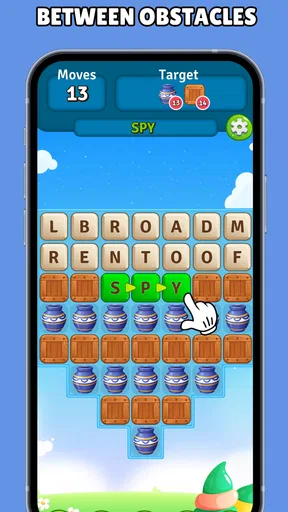
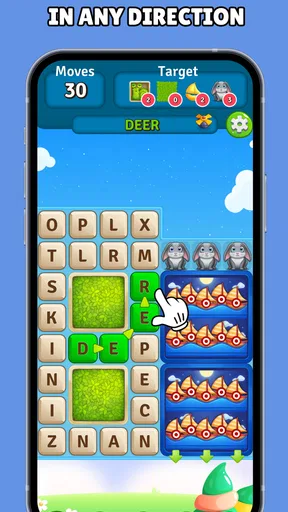
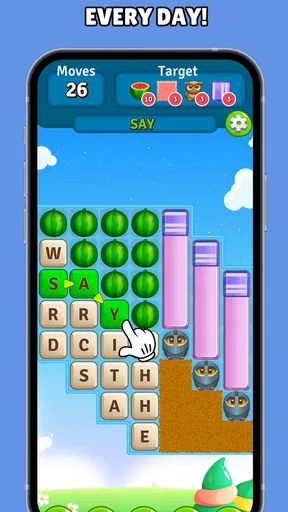
To play, you scan the letter grid and swipe across connected letters to identify the words requested for each level. Words may appear horizontally, vertically, diagonally, or in reverse, depending on the puzzle design. The controls are simple and responsive, so most players can begin immediately without a tutorial. Careful observation is important because some words can be well hidden among similar-looking letters.
Is Alphabet Scape: Search Words suitable for children and beginners?
The game is generally suitable for casual players, children who can read, and anyone who enjoys vocabulary-based puzzles. Its basic controls and straightforward objective make it approachable, while later stages may require more concentration and a broader vocabulary. Parents should still check the current age rating, advertising settings, and any in-app purchase information shown on the relevant Android or iOS store page before allowing younger children to play.
Does Alphabet Scape: Search Words work offline?
Many word-search games allow players to complete previously loaded levels without an internet connection, which makes them convenient for travel or areas with limited coverage. However, features such as advertisements, analytics, updates, cloud synchronization, or online rewards may require internet access. Because offline behavior can vary between versions and devices, it is best to test the game after installation and review the permissions and store description before relying on it offline.
Are there ads or in-app purchases in Alphabet Scape: Search Words?
The availability of advertising and optional purchases can depend on the version of Alphabet Scape: Search Words, your platform, and regional store settings. Free puzzle games commonly use ads to support development, while purchases may remove advertising or provide hints and other conveniences. Before downloading, check the Google Play or App Store listing for the latest pricing details, then review the in-game purchase screen carefully before confirming any transaction.


